
Divisions & Pricing
Create multiple divisions with individual pricing, capacity limits, team options, and free or paid entry.
What are divisions?
Divisions are the competition categories within your race. Each division can have its own pricing, capacity, and rules. For example, a HYROX simulation might have:
- Open Individual — 500 SEK, 60 spots
- Pro Individual — 600 SEK, 30 spots
- Open Doubles — 800 SEK per team, teams of 2
- Spectator / Volunteer — Free
Creating divisions
Divisions are managed on the Divisions & pricing page (Race Management → Planning). Click Add division, or a division in the list to open its editor. For each division, you can configure:
- Name and description — the description is shown to athletes
- Color — used for the division in heats and the startlist
- Price (or tick Free entry)
- Currency — SEK, EUR, USD, GBP, NOK or DKK. If divisions use different currencies, each athlete is charged in their division's currency
- Max spots — Limit the number of spots, or tick No limit
- Entry — Solo or Team, with Min members and Max members for team divisions (one registration per team)
- Visible to athletes — Hidden divisions aren't shown on your public race page or in the registration wizard, but you can still register athletes into them manually
You can also Duplicate a division (from its ··· menu or the bottom of the list) to start from an existing one, and Hide/Show or Delete it from the same menu.
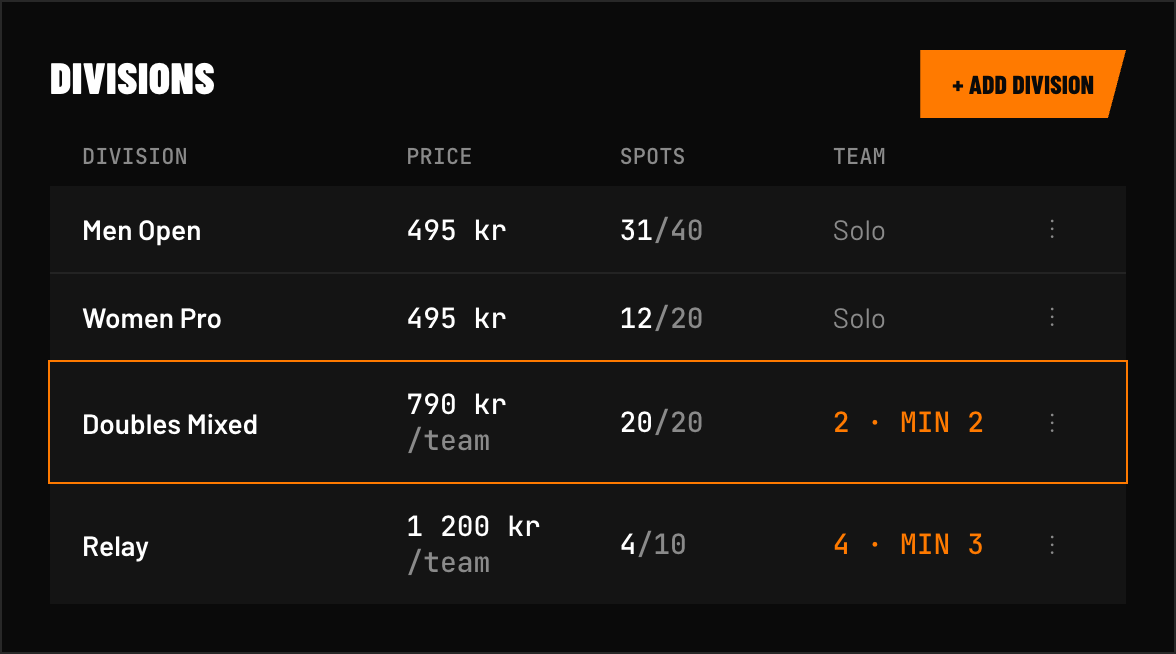 FIG 1 — The Divisions & pricing list shows each division's registered count against its max spots, its price (per athlete or per team) and its status — Open, Full or Hidden. Team divisions show "Team of N" next to the name; the min/max members you set drive the teammate rows at registration.
Division order
The order of the list on the Divisions & pricing page is your division order. Drag any division up or down using the ⋮⋮ handle on the left to reorder it.
The order matters when generating heats. When using the By division order + estimated time strategy, heats are filled in the order divisions are listed here — so the division at the top starts first, the next one second, and so on. Set the order before generating heats to control which divisions run at the start of the day and which run later.
Free divisions
Free divisions have no platform fee. Use them for volunteers, spectators, or any category that doesn't require payment. You can mix free and paid divisions in the same race.
Pricing display
Athletes see division pricing on your public race page. When capacities are set, each division also shows its spots left — use Show spots remaining when % full (Setup → Race details) to only show them once the race is filling up. When a division fills up, registration automatically closes for that division. You can also cap the whole race with Max athletes (global cap) in Race details.
Early bird pricing
Each paid division can offer a discounted price for a limited time before the regular price takes over (the option isn't available for free divisions).
To set it up, turn on Offer early bird pricing on a division and configure:
- Early bird price — must be lower than the regular price
- Early bird starts / Early bird ends — a start and end date/time, in your race's own timezone
- Registration limit (optional) — stop the discount automatically once a set number of early bird registrations come in, even if the window is still open. Leave blank for no limit
While the window is open (and under the limit, if set), athletes registering into that division are charged the early bird price automatically. Outside the window, or once the limit is reached, the price reverts to the regular price.
The early bird price shows on the public Divisions & Pricing section and in the registration wizard, with the regular price struck through and an "Early bird" label while it's active. Athletes you register manually are also charged the early bird price while it's active.
Once a registration is created, the price it was actually charged doesn't change if you edit the division's window or price afterward.