
Team Races
Run team-based competitions with configurable team sizes, member management, and team leaderboards.
Team divisions
Any division can be configured as a team division. On the Divisions & pricing page, set the division's Entry to Team and choose Min members and Max members — from doubles (2 members) to larger squads.
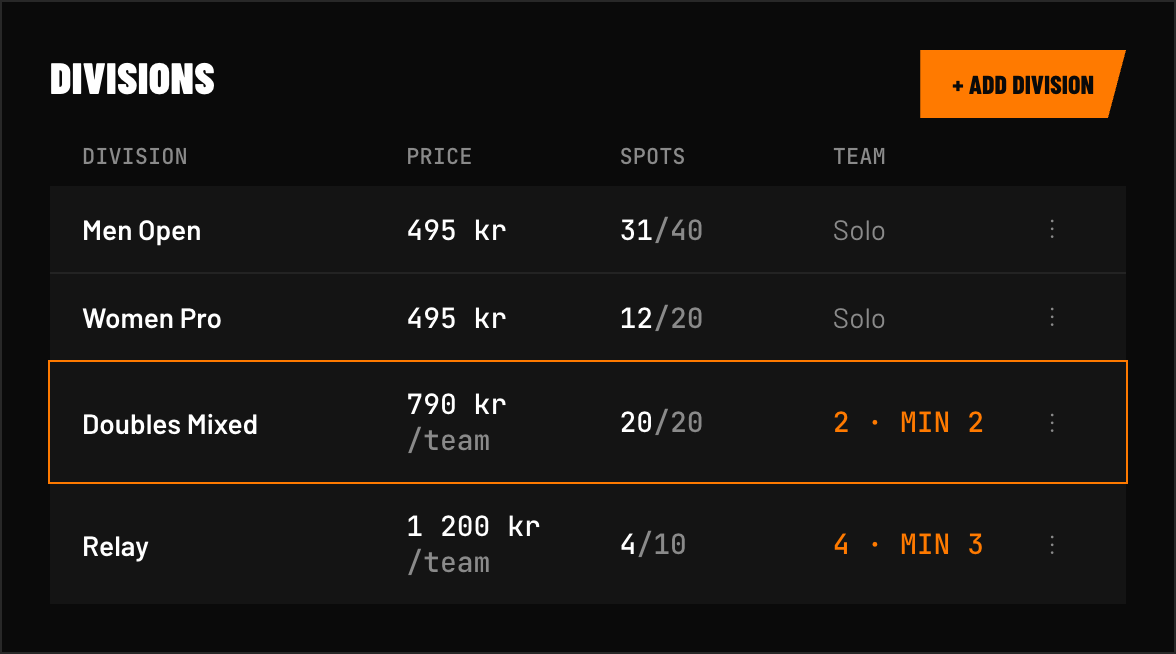 FIG 1 — Team divisions show "Team of N" next to their name and are priced per team; the min/max members you set drive the teammate rows at registration.
How team registration works
- The team captain registers and creates the team, typing in each teammate's name (and email, if you require it — see below) during the same registration — or leaving spots open to fill in later, if you allow it. Teammates are always entered by the captain, never searched for, so no athlete's details are shown to other users.
- Each member's profile is linked to the team
- The team registers for a division together
Team member email — optional or required
By default, the captain must enter an email for every teammate at registration. A per-race Team registration setting (Registration options → Require team member email) lets you make this optional instead — the captain can add teammates by name only and fill in emails later.
When a team has one or more teammates without an email on file:
- The Athletes list flags the team with an amber team icon in the Info column (the tooltip names who's missing an email), and the Incomplete roster status filter finds every incomplete team at a glance. A team without the icon has a complete roster.
- Use the Remind team captain… action to email the captain exactly which teammates still need an email.
- The captain can finish the roster themselves from My registrations → Complete team, or via the no-login-required link in a reminder email — each teammate then gets their own account invitation as soon as their email is added.
- Captains are reminded automatically — see Roster reminders below.
Naming teammates later
Turn on Allow captain to add teammates later (Registration options → Team registration) to let a captain register before they know who's joining. At registration, each teammate spot gets an I will identify my teammate later checkbox — the captain can fill in some teammates now and leave the rest open.
- Roster deadline — optionally set when captains should have completed their team, in your race's timezone. It's shown to captains during registration, in My registrations, and in reminder emails. Nothing is locked or cancelled when it passes — still-incomplete teams stay flagged so you can sort them out at check-in.
- Completing the team — captains open My registrations → Complete team (or the link in a reminder email) and enter each missing teammate's first name, last name, and email.
- Athletes list — open spots count as an incomplete roster: the same icon, filter, and Remind team captain action apply, and the tooltip shows how many teammates haven't been added yet.
Roster reminders
With Send roster reminders on (the default), captains of incomplete teams are emailed automatically:
- With a roster deadline — 7 days before and the day before the deadline. Nothing is sent after the deadline has passed.
- Without a deadline — once, 3 days after registering (skipped if you've already reminded the captain manually).
Reminders only go out for races that haven't started yet. You can always remind a captain manually from the Athletes list.
Team management
On the Athletes page, each team is listed under its captain with every teammate's name below. Click any team member's name to open the edit drawer, where you can:
- View and edit every member's details
- + Add athlete — fill an open spot by searching past participants or creating a new athlete (optionally sending them an account invitation)
- Replace a teammate with someone else
- Remove from team — also allowed below the division's minimum; the team is then flagged as an incomplete roster
- Make captain — hand the team registration to another teammate. It takes effect right away and both people are emailed; the new captain needs an email on file
You can also:
- Assign teams to heats on the Heats & waves page — teammates always move with their captain
- Track team results together
Team leaderboards
Team results are displayed on the leaderboard with all member names shown. Teams are ranked using your race's scoring mode — Total Time or Total Points (Planning → Scoring) — the same way as individual entries.