
Stripe Connect Integration
Connect your Stripe account to receive direct payments from athlete registrations. Setup takes about 5 minutes.
What is Stripe Connect?
Stripe Connect is a payment platform that allows RoxRace to route payments directly to your bank account. Unlike traditional payment processors, your money never sits in a RoxRace account. (Prefer not to use your own Stripe account? Choose RoxRace collects for the race instead — see Requesting a Payout from RoxRace.)
Setting up
- Navigate to Payments & fees in your organizer dashboard (under Money in the sidebar)
- Click Connect with Stripe
- Complete the Stripe onboarding process:
- Business information (name, type, country)
- Bank account details for payouts
- Identity verification (required by regulations)
- Once the page shows Account setup: Complete and Payments: Enabled, your account is active
The entire process typically takes about 5 minutes. Stripe may take 1-2 business days to verify your identity. When you're done you're taken back to Payments & fees. If Stripe finishes verifying you later, the status updates by itself on your organization and every race using the account.
Only the organization owner can connect or disconnect Stripe. Disconnecting only removes the link to RoxRace — your Stripe account, balance and payment history stay in Stripe.
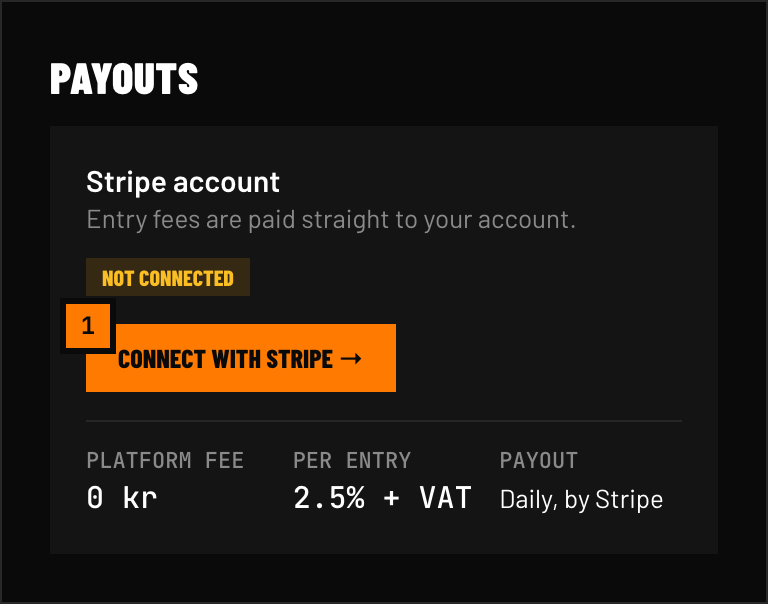 FIG 1 — Connect with Stripe takes you to Stripe onboarding; when you return, Account setup and Payments turn green once connected.
Connecting an existing race
Connecting on Payments & fees sets your organization's default Stripe account, which is linked to races you create afterwards (see Organisation Payment Defaults). Races created before that are not updated.
For an existing race, go to Race Management → Setup → Payment, choose Own Stripe account, and use Connect with Stripe in the Connect payment account section. The same section shows the race's Account Setup and Payments status and a Complete Stripe Setup button if anything is still missing.
Until setup is complete
A race using its own Stripe account can't be published, and athletes can't register for paid divisions, until the race's Payment page shows both Account Setup: Complete and Payments: Enabled. This also applies if you disconnect Stripe or switch the payment mode after publishing — athletes choosing a paid division see a message that the organizer hasn't finished setting up payments.
Free divisions stay open for registration, and races using RoxRace collects are not affected.
What happens when an athlete pays
- Athlete completes checkout on your race page
- Stripe processes the card payment
- RoxRace platform fee is deducted automatically
- The remaining amount is deposited to your Stripe balance
- Stripe transfers to your bank account on your payout schedule
Supported countries
Stripe Connect is available in 40+ countries. Check Stripe's availability page for your country.
Security
All payment data is handled by Stripe. RoxRace never sees, stores, or processes credit card numbers. Stripe is PCI DSS Level 1 certified — the highest level of payment security.